Craft Fair Inventory Sheet: Free Template and How to Use It
A craft fair inventory sheet answers the question you ask yourself every Sunday night after a market: what actually sold? Not the feeling ("the candles did well"), but the count, product by product. With one simple sheet you can see what you brought, what came home, what sold, the sell-through rate and the profit per product, and you can use all of it to pack for the next market. This guide explains each column, how to use the sheet before, during and after a market, and gives you a free template with the formulas already in place.
Download the free craft fair inventory sheet template (CSV). It opens in Google Sheets, Excel or LibreOffice. The example rows show a two-day holiday market; replace them with your own products.
What goes on a craft fair inventory sheet
One row per product (or per design, if designs sell very differently). The template has these columns:
| Column | You fill it in | What it's for |
|---|---|---|
| Market, Date | Before | Which market the row belongs to |
| Product | Before | Use the same names every time, so markets compare |
| Price | Before | The sign price at this market |
| Cost per item | Before | Materials and packaging for one item |
| Brought | Before | Counted when you pack |
| Tally during the day | During (optional) | One mark per item sold |
| Came home | After | Counted when you unpack |
| Sold | Calculated | Brought minus came home |
| Unaccounted | Calculated | Sold minus tally, when you keep a tally |
| Sell-through % | Calculated | Sold divided by brought |
| Revenue at list price | Calculated | Sold times price |
| Profit before market costs | Calculated | Sold times (price minus cost) |
| Notes | Any time | Gifts, breakage, a price change, a sold-out time |
The calculated columns fill themselves in as soon as you type the counts. A totals row at the bottom adds everything up for the market.
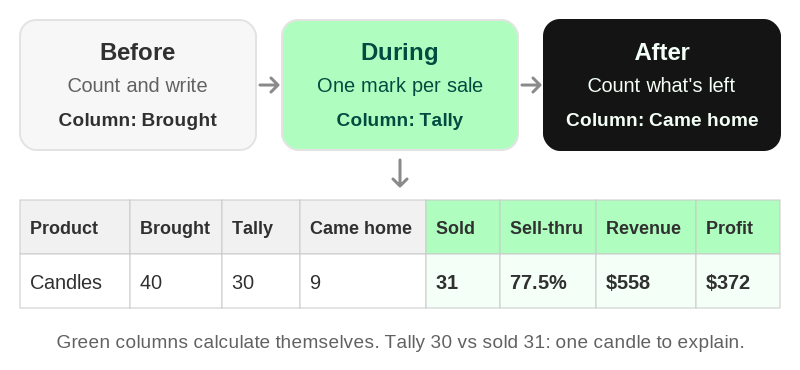
Before the market: count what you bring
The "Brought" column is the one that makes everything else work, so count when you pack, not from memory.
- Count by box. Pack each product (or group of products) in its own box or bag and write the count on a piece of tape on the lid. When you unpack after the market, the label tells you what went out.
- Fill in price and cost now. If you're trying a new price at this market, write it down, so you know later which price the results belong to.
- Use the same product names every time. "Lavender candle 8 oz" at one market and "Lav candle" at the next can't be compared.
If you're not sure how many to bring in the first place, our guide on how much inventory to bring to a craft fair works it out from a sales target. Our printable craft fair checklist also has a small "count what you bring" table if you prefer paper.
During the market: a tally, if you can
The tally column is optional. A mark on a notepad (or the printed sheet) for every item sold gives you two things:
- A check on the final count. If your tally says 30 candles and your count says 31 sold, one candle needs an explanation: a gift, a sample, breakage, a miscount or, now and then, theft. The "Unaccounted" column shows the difference.
- A sense of timing. Draw a line under the marks at noon and you'll see which products sell in the morning and which in the afternoon.
On busy markets a tally is hard to keep up with. Skip it rather than keep it badly, and rely on the before and after counts. If your card reader app records items, every sale rung up properly is already a tally; see the section on POS systems below.
After the market: count what came home
Unpack, count each box and fill in "Came home." Here's the example from the template, a two-day holiday market (example numbers):
| Product | Price | Cost | Brought | Tally | Came home | Sold | Sell-through | Revenue | Profit |
|---|---|---|---|---|---|---|---|---|---|
| Ornaments | $12 | $3.00 | 80 | 64 | 16 | 64 | 80% | $768 | $576.00 |
| Earrings | $22 | $5.00 | 60 | 33 | 27 | 33 | 55% | $726 | $561.00 |
| Candles | $18 | $6.00 | 40 | 30 | 9 | 31 | 77.5% | $558 | $372.00 |
| Mugs | $34 | $11.00 | 30 | 12 | 18 | 12 | 40% | $408 | $276.00 |
| Stickers | $4 | $0.60 | 150 | 96 | 54 | 96 | 64% | $384 | $326.40 |
| Wall hangings | $85 | $28.00 | 8 | 1 | 7 | 1 | 12.5% | $85 | $57.00 |
| Totals | 368 | 236 | 131 | 237 | 64.4% | $2,929 | $2,168.40 |
One candle is unaccounted for: the tally says 30, the count says 31. In this example it went into a raffle basket, so the note says so. If unexplained gaps show up market after market, look at how your booth is laid out and where small items sit.
Reading the sheet
Sell-through shows demand at the price you charged. In the example, ornaments and candles sold most of what came, mugs and wall hangings sold less than half. Our guide to what sells best at craft fairs uses these same numbers (plus profit per foot of table) to sort products into stars, traffic builders and anchors.
Revenue at list price assumes every item sold at its sign price. Bundles, discounts and custom orders make the real total different. Compare the sheet's revenue with your actual takings (card sales plus cash and payment apps). A big gap usually means bundles or discounts you didn't write down, or sales you didn't ring up.
Profit before market costs is sales minus what the items cost you. It doesn't include the booth fee, gas, food or card fees, so it isn't the market's real profit. Put the market's totals into the free craft fair profit calculator to get the real number, the booth fee multiple and profit per hour.
Use the sheet to pack for the next market
The sheet is most useful the week before the next market of the same type. A simple rule: bring what sold last time, plus a buffer for your best sellers, but never less than a full-looking display.
Example (made-up numbers, same type of holiday market):
| Product | Sold last time | Buffer | Bring next time | Why |
|---|---|---|---|---|
| Ornaments | 64 | × 1.5 | 96 | High sell-through; don't run out |
| Earrings | 33 | × 1.5 | 50 | Star product; keep the display full |
| Mugs | 12 | × 1.5 | 18 | Low sell-through; bring fewer than last time (30) |
| Wall hangings | 1 | display minimum | 3 | Enough to show the range on the back wall |
After two or three markets of the same type, use the average instead of one result. Our guide to multi-day craft show goals explains how to split stock and targets by day for longer shows.
When a POS replaces part of the sheet
If you ring up every sale on a card reader app that records items, the app already knows what sold, including cash sales you enter as cash. In that case the "Sold" and "Tally" columns can come from the app's sales-by-product report for the market's dates. Our guide to tracking craft fair sales in Shopify POS shows how to pull one market's sales; most POS apps have a similar report.
You still need the counts, for two reasons:
- Brought and came home aren't in any sales report, and sell-through needs both.
- Sales you didn't ring up (a quick cash sale, a gift, a trade with another vendor) only show up when the count doesn't match the report.
Some vendors keep the POS for sales and the sheet for counts and notes. That works well: the sheet stays short and the numbers check each other.
Paper or spreadsheet?
Either works if you use it every time. Paper is faster at the booth; a spreadsheet does the math and keeps every market in one place. A common middle ground: print the sheet with the product names, prices and "Brought" filled in, mark the tally by hand during the day, and type the counts into the spreadsheet on Sunday night. For a season view across markets, add each market's totals to a craft fair profit spreadsheet, one row per market.
FAQ
What should a craft fair inventory sheet include?
At minimum: product, price, cost per item, how many you brought and how many came home. From those you get sold, sell-through, revenue and profit per product. A tally column and a notes column help explain any gaps.
How do I track inventory at a craft fair without a POS?
Count everything when you pack and when you unpack, and keep a tally of sales on paper during the day if you can. Sold is brought minus came home, and the tally tells you whether anything went missing.
How do I calculate sell-through at a craft fair?
Divide the number sold by the number you brought. If you brought 40 candles and sold 31, sell-through is 31 ÷ 40 = 77.5%. Compare it across markets of the same type to see which products to bring more or less of.
Is there a free craft show inventory template?
Yes, the CSV template linked at the top of this guide is free. It includes the columns above, formulas for sold, sell-through, revenue and profit, an example market and a totals row. It works in Google Sheets, Excel and LibreOffice.