Venmo, Zelle and PayPal at Craft Fairs: Fees and Safe Setup
Sooner or later a shopper at your booth says "Can I just Venmo you?" Taking Venmo, Zelle and PayPal at craft fairs is easy to start and easy to get slightly wrong: a personal account where a business one fits better, a fee you didn't expect, a screenshot instead of a real payment, or app sales that never make it into your totals. This guide covers which kind of account to use, what each app charges a seller (from each company's own pages, checked in November 2026), how to confirm a payment before the customer walks away, and how to record these sales so the market's numbers stay honest.
Fees and rules change, so treat every number here as a starting point and confirm it on the provider's site before you print your sign.
Personal or business account: why it matters
Most people start by sharing their personal handle. It works, but the apps draw a line between paying friends and paying for goods, and that line affects fees and protection:
- Venmo offers business profiles for selling. Its fees page lists a seller fee for payments received in a business profile, and a separate rate when a payment to a personal account is marked as goods and services. Its Purchase Protection page explains that the seller fee is what pays for that program on eligible purchases.
- PayPal business accounts can take payments with a QR code the customer scans with their phone.
- Cash App has Cash App Business accounts with their own fee schedule.
- Zelle sends money between bank accounts. Zelle's page for small businesses says whether you can use it as a business, and what it costs, depends on your bank.
If you sell regularly, a business profile or account keeps your sales separate from dinner money with friends, which makes your records much easier at the end of the season.
What each app charges a seller
Here's what each company lists for a US seller receiving a payment in person, checked in November 2026. Follow the links for the current terms.
| App | Seller fee listed | Source |
|---|---|---|
| Venmo business profile | 1.9% + $0.10 for payments from other Venmo accounts | Venmo help center |
| Venmo personal account, marked goods and services | 2.99% | Venmo fees |
| PayPal QR code (business account) | 2.29% + $0.09 | PayPal QR codes |
| Cash App Business | 2.6% + $0.15 for payments from a Cash App account | Cash App Business fees |
| Zelle | Zelle says fees for small businesses depend on your bank | Zelle for small businesses |
One note: Venmo's own pages list different numbers for Tap to Pay, so if you plan to use that feature, check the current rate in the app. Fees and programs change, so confirm each app's current terms before market day.
A $30 sale: app fees next to card fees
Here's what each option keeps from a $30 sale, using the published rates above and the entry-plan card rates from our best card reader for craft fairs comparison. These are calculated examples, not quotes.
| How the customer pays | Fee on $30 | You keep |
|---|---|---|
| Zelle (if your bank charges nothing) | $0.00 | $30.00 |
| Venmo business profile (1.9% + $0.10) | $0.67 | $29.33 |
| PayPal QR code (2.29% + $0.09) | $0.78 | $29.22 |
| Card, Shopify Basic (2.6% + $0.10) | $0.88 | $29.12 |
| Venmo personal, goods and services (2.99%) | $0.90 | $29.10 |
| Card, Square Free (2.6% + $0.15) | $0.93 | $29.07 |
| Cash App Business (2.6% + $0.15) | $0.93 | $29.07 |
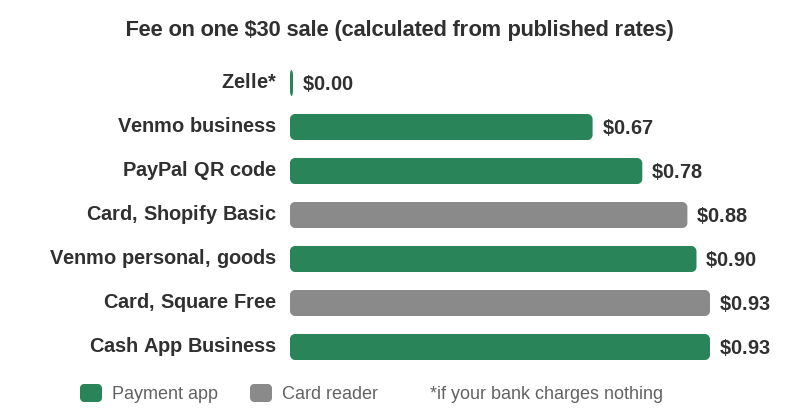
The spread is about 26 cents between the cheapest paid option and the most expensive one. Over a market with 15 app payments, that's under $4. Fees matter, but they're rarely the deciding factor. What matters more is that the money really arrived and that the sale ends up in your records.
Put your handle or QR code where people pay
Shoppers who want to pay by app will ask "what's your Venmo?" and then type it on their phone while you wait. A sign at the checkout spot saves that time and avoids paying the wrong person:
- One line per app: "Venmo @your-shop-name," "Zelle: your business email or phone," "PayPal: scan the code."
- QR codes big enough to scan from where the customer stands. Print one and test it at arm's length at home.
- The same sign photographed on your phone, in case it blows away.
Our guide to vendor booth signs covers sizes and placement. Keep the handle sign separate from the cash box area; our craft fair booth security guide explains why it's better to never hand your phone to a customer.
Confirm the payment before the customer leaves
A payment-app sale isn't finished when the customer says "sent!" It's finished when the money shows up in your account. A few habits that prevent most problems:
- Look at your own app, not their screen. Check that the payment appears in your account, from the name they gave you, for the right amount.
- Wait for it when you're not busy. Most payments show up quickly. If yours hasn't, ask the customer to check whether it went to the right handle.
- Be extra careful with Zelle. Zelle says it doesn't offer purchase protection and describes itself as a way to pay people you know and trust. Zelle also recommends double-checking the recipient's details, so make sure your sign shows the right email, phone number or Zelle tag.
- Big sales, extra check. For a $200 piece, wait until you see the payment in your account before wrapping it.
A polite line works: "Thanks! Let me just see it come through." Most shoppers expect it. Our guide on what to say to customers at a craft fair has more lines for the checkout.
Record every app sale where your other sales live
This is the step that gets skipped. A Venmo payment lands in the Venmo app, not in your card reader's report. If you don't record it, your market looks smaller than it was, and your profit math is wrong.
- In your POS: add a custom payment type for each app. In Shopify POS, you can add custom payment types in the Point of Sale settings. Shopify doesn't process those payments, but the order records which app was used, so your reports include it. Our Shopify POS setup for craft fairs checklist walks through it, and tracking craft fair sales in Shopify POS shows where the totals appear.
- On paper: if you don't use a POS, a simple tally line per app works. At the end of the day, compare the tally with each app's history.
- Refunds: decide in advance how you'll refund an app payment. Our craft fair refund policy guide covers refunds by payment type.
Then count app fees as a market cost, next to card fees. Our craft fair expenses checklist has a line for them, and the free craft fair profit calculator lets you enter card and app fees as a dollar amount.
A quick word on taxes
Sales paid by app are still sales: they count toward your income and, where your state requires it, sales tax. Venmo and Cash App each have help pages about tax reporting (Venmo tax FAQ, Cash App Form 1099-K FAQ), and Zelle says it doesn't report transactions to the IRS and that reporting taxable income is your responsibility. This isn't tax advice; ask a tax professional how it applies to you, and see our craft fair sales tax guide for the sales tax side.
A simple setup for your next market
| Step | Do it |
|---|---|
| Before the season | Open business profiles or accounts for the apps you'll accept |
| Before the season | Add a custom payment type for each app in your POS |
| The week before | Print one sign with handles and QR codes; test each code |
| At the market | Check each payment in your own app before handing over the item |
| After the market | Compare app histories with your POS or tally; add app fees to costs |
FAQ
Should I accept Venmo, Zelle and PayPal at a craft fair?
If your customers ask for them, it usually makes sense to accept at least one or two, especially for shoppers without much cash. Use business profiles or accounts where the app offers them, put your handles on a sign, and record every app sale in your POS or tally.
What does Venmo charge a seller?
Venmo's help center lists 1.9% + $0.10 for payments from other Venmo accounts to a business profile, checked in November 2026. A payment to a personal account marked as goods and services is listed at 2.99%. Check Venmo's fees page for current rates.
Is Zelle safe for selling at craft fairs?
Zelle moves money between bank accounts and says it doesn't offer purchase protection, so confirm the payment arrived in your bank app before handing over the item. Whether you can use Zelle as a business, and any fees, depend on your bank.
How do I track Venmo and Zelle sales from a market?
Add a custom payment type for each app in your POS and ring up the sale with it, or keep a tally line per app. At the end of the day, compare those totals with each app's history so the market's sales and fees are complete.